Coming soonVOCVOC AI Edge·Built with Tarkashila

Your cameras already see everything. Now something watches.

VOC AI Edge adds AI to the CCTV cameras and DVR you already own. It spots intruders, counts visitors, watches queues and reads vehicles in real time, and tells you within seconds, with the photo and the clip. No new cameras. Your video stays on site.

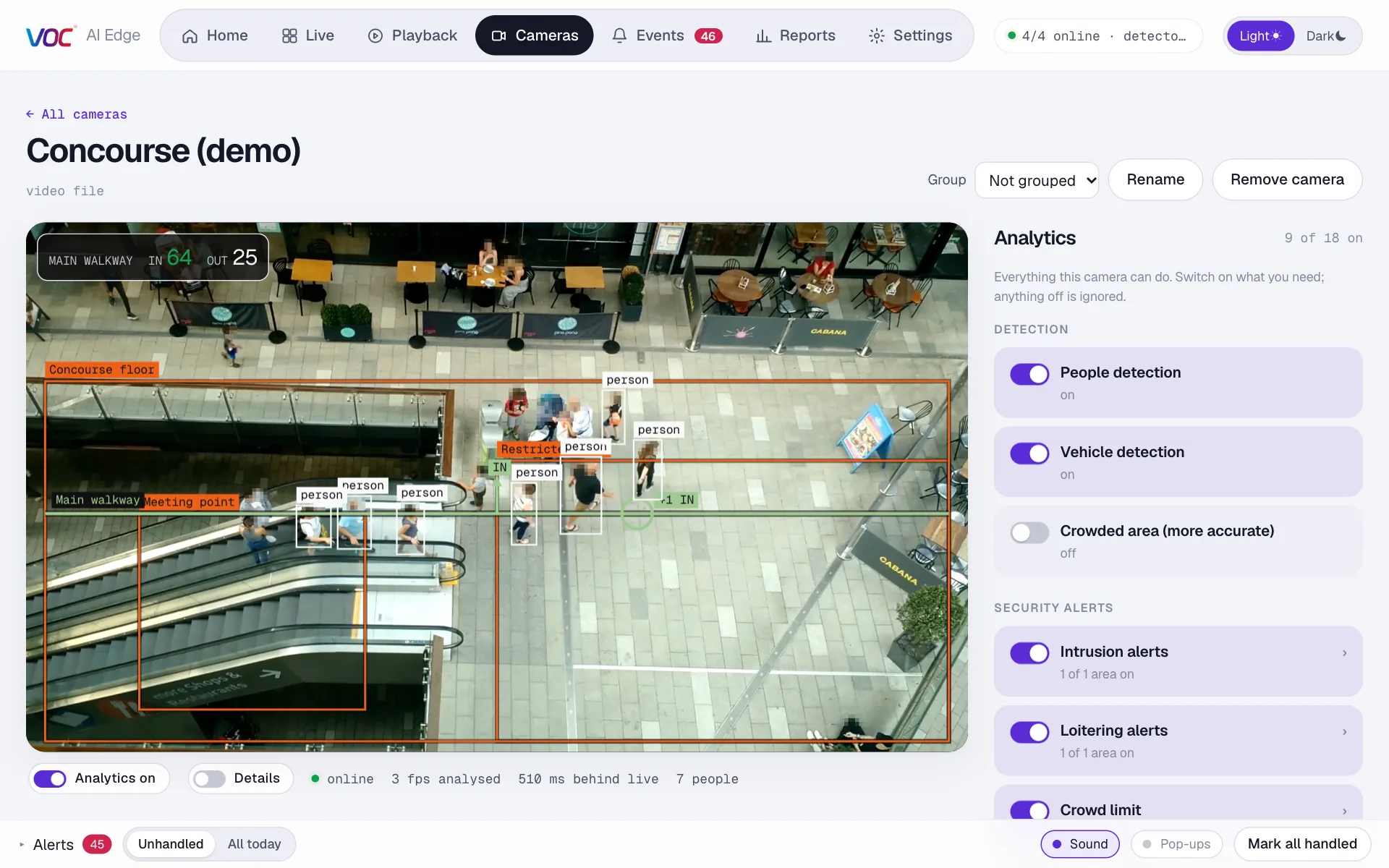
VOC AI Edge camera page: people tracked with boxes, alert areas drawn on a walkway, live in and out counts, and the analytics switched on for that camera
● live · people tracked and counted
Works with the cameras you haveHikvisionPramaDahuaCP PlusUniviewAxisAnalog HD via DVRAny ONVIF / RTSP camera

Our story

Most CCTV is a recording that nobody watches until something has already gone wrong.

Walk into almost any shop, pharmacy, warehouse, office or lodge and you will find the same thing: a recorder in a cupboard, filming eight or sixteen cameras day and night. The footage is there. Nobody is looking at it. It gets opened after a theft, after a fight, after a delivery went missing, and by then it can only explain what happened, not stop it.

We started VOC AI Edge to change that, without asking anyone to throw away cameras they have already paid for.

Why we are building it

Software that watches cameras for you already exists. But most of it was built for large companies with fast internet: buy new cameras, send every video to the cloud, pay per camera in dollars. For a store in Hyderabad or a camp outside Arusha, upload speeds are low, budgets are careful and the DVR is already on the wall.

So we built the other way round. VOC AI Edge runs at the site, next to your recorder, reads the cameras you have, and only sends what matters: the alert, the photo, the clip and the numbers.
2–3 sfrom someone stepping into an area to the alert on screen
0new cameras needed: use the DVR, NVR and IP cameras you have
2.6 TBa month a 16-camera site would upload to send everything to the cloud. We don't.

Analytics

Every camera gets its own list of analytics. Turn each one on or off, draw where it applies, and pick the hours it is armed.

Intrusion alerts

Someone enters an area you drew, like a back gate after hours, a cash room or a stockroom. You get the photo and the clip.

Loitering

Someone stays too long in one place, near an ATM, a door or a counter. Passers-by are ignored.

People counting

In and out across a doorway, by hour and by day. A wrong-way alert when someone walks against the flow.

Crowd limit

Too many people in a space for longer than a few seconds: a showroom, a lift lobby, a fire exit.

Queues and waiting time

How many are waiting and for how long, live on the picture. An alert when the queue grows or someone waits too long.

Vehicle type and colour

Car, truck, bus or motorbike, with its colour, counted in and out at gates and parking entrances.

Abandoned bag

A bag or suitcase left alone in an area for longer than you allow.

Heatmaps

Where people and vehicles actually spend time, day by day. Useful for layout, staffing and display decisions.

Camera health

A camera goes offline or the recorder stops answering. You hear about it straight away, not a week later.

Face blurring

Faces are pixelated in photos and on screen when privacy matters more than identity.

The product

If you have used a recorder's own viewer before, you already know your way around. Live view, playback, events, reports. The difference is that every screen now has AI working on it.
Live

Every camera, analysed live

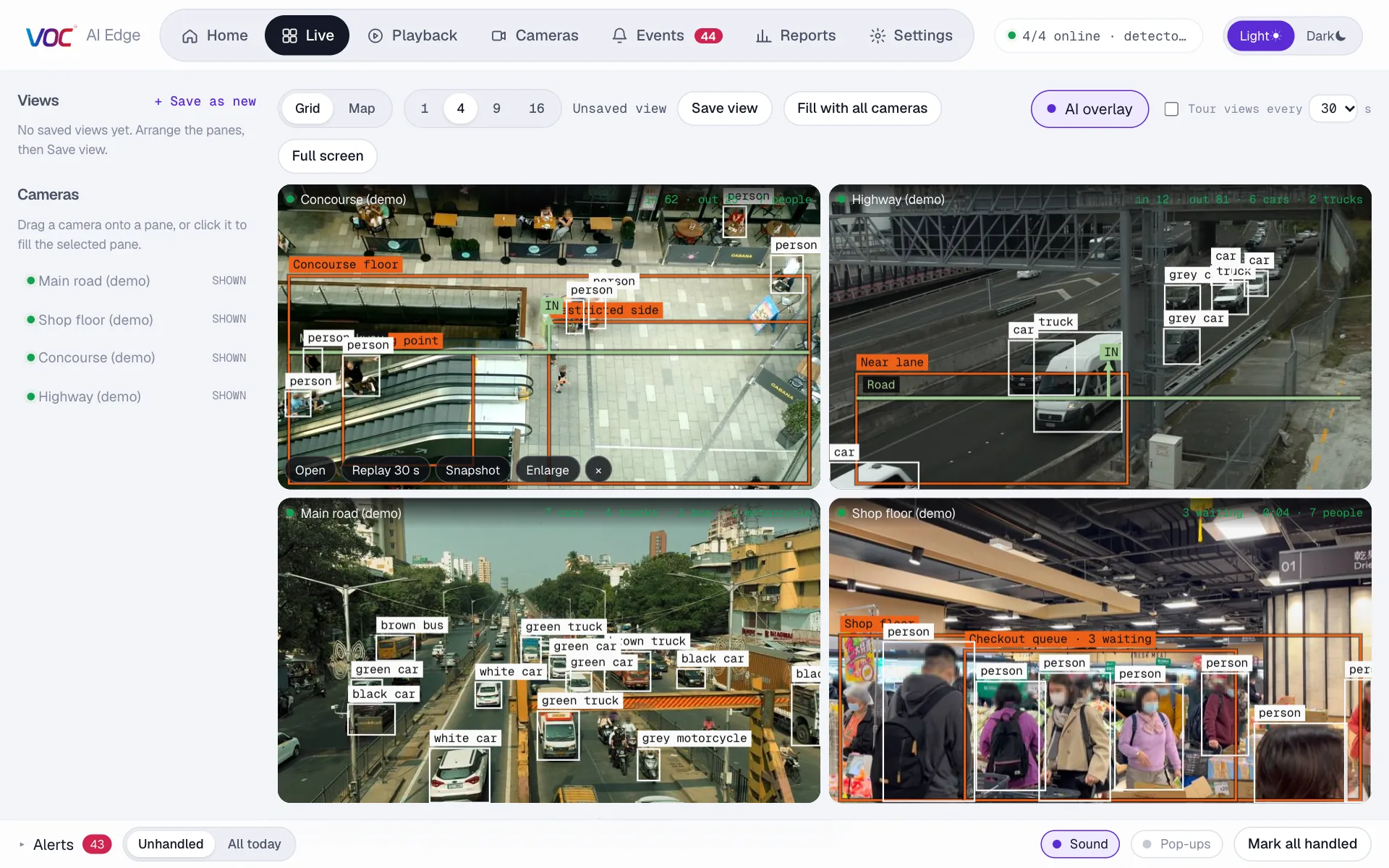
Watch 1, 4, 9 or 16 cameras at once with the AI drawn on top: people and vehicles tracked, areas outlined, counts and queue length on each picture.

  • Save layouts like “Ground floor” or “Night: outside”
  • Tour mode for a wall monitor
  • A camera's picture turns gold when it raises an alert
Live view with four cameras: a mall walkway with people tracked and counted, a highway with vehicles labelled by colour and type, a city road with number plates read, and a shop floor with a checkout queue
Alerts

Know within seconds, with proof

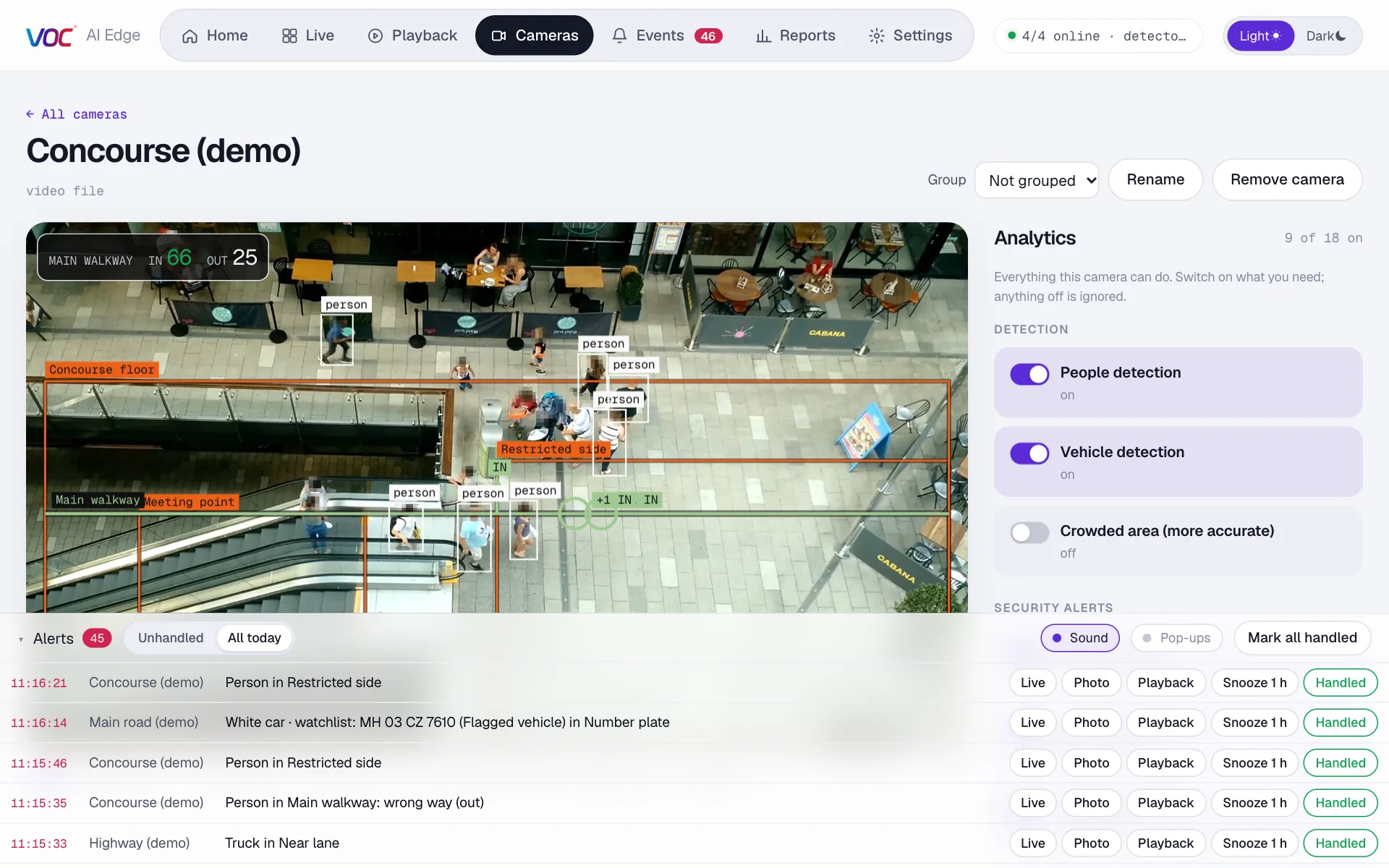
Each alert comes with a photo, a short video clip and a sound, and can go straight to a phone. Guards mark it handled with a note, so the owner can see who checked what.

  • Pop-up with the photo on any screen
  • Alert tray with Live, Photo and Playback in one click
  • Every action kept in an activity log
Camera page with the alert tray open: a list of alerts such as a person in a restricted area, a watchlist number plate and a truck in a lane, each with Live, Photo, Playback and Handled buttons
Playback

Jump straight to the moment

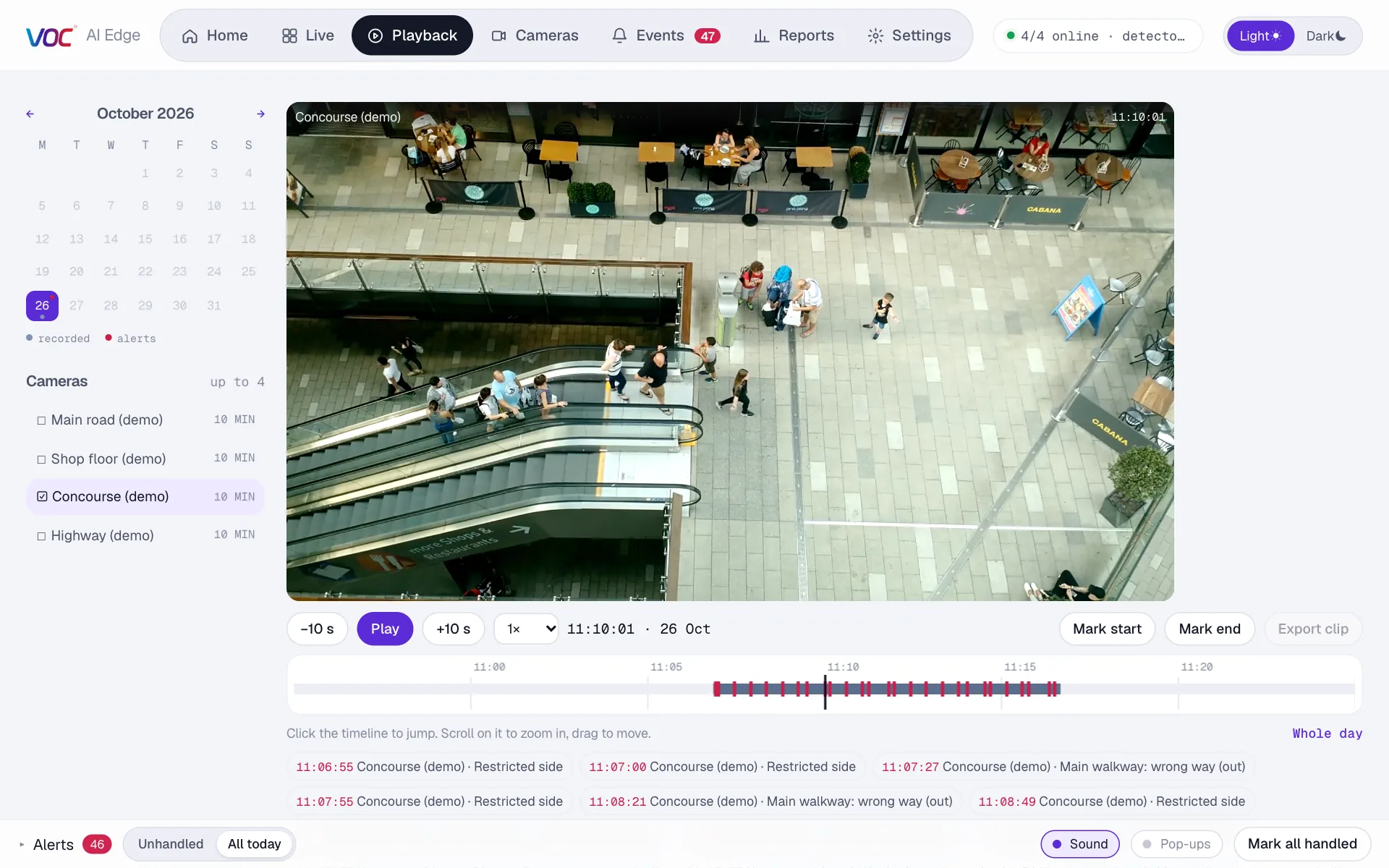
A calendar shows the days with recordings and alerts. The timeline marks every event, so you open the moment just before it happened instead of scrubbing through hours of video.

  • Up to four cameras in sync
  • Play at half speed up to eight times
  • Mark a start and end, export the clip
Playback screen with a calendar, a camera list, the recorded video and a timeline with alerts marked
Vehicles

Gates, parking and roads

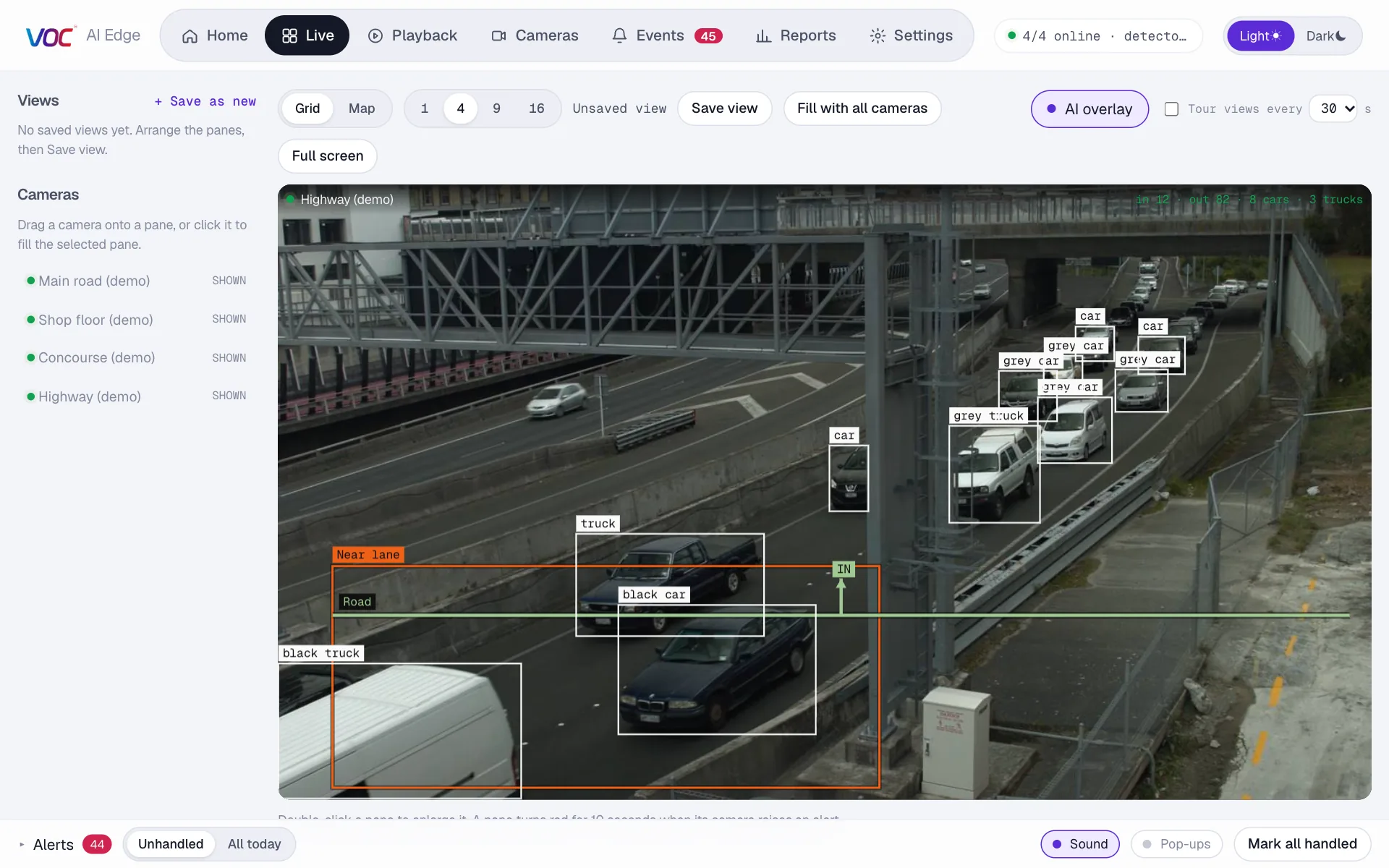
Vehicles are labelled by type and colour and counted in both directions. Draw a lane or a gate area and get an alert when a vehicle enters it out of hours.

A highway camera with vehicles labelled by type and colour, such as black truck, grey car and black car, a counting line across the road and a lane area outlined
Number plates

Every plate, with a photo

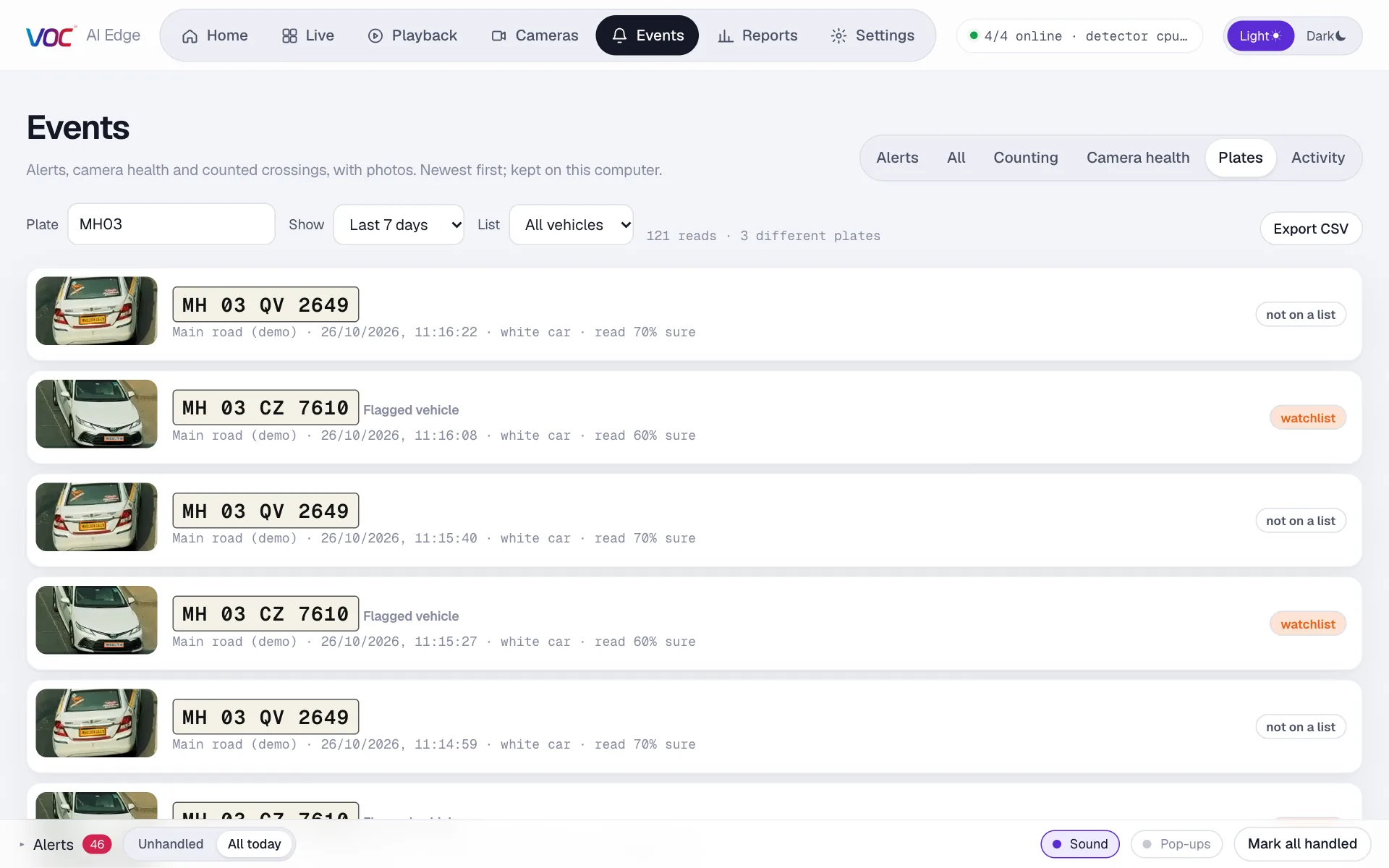
Turn on number plates for a camera that sees vehicles. Each plate is read and logged with a photo, built for Indian plates including two-line bike plates. Search any number, and get an alert the moment a watchlist plate shows up.

  • Watchlist and allowed lists
  • Search by full or part of a number
  • Export the plate log to CSV
Plate log searched for MH03: number plates read from a city road, each with a photo of the vehicle, the time and how sure the reading is, one marked watchlist
Reports

The numbers behind your site

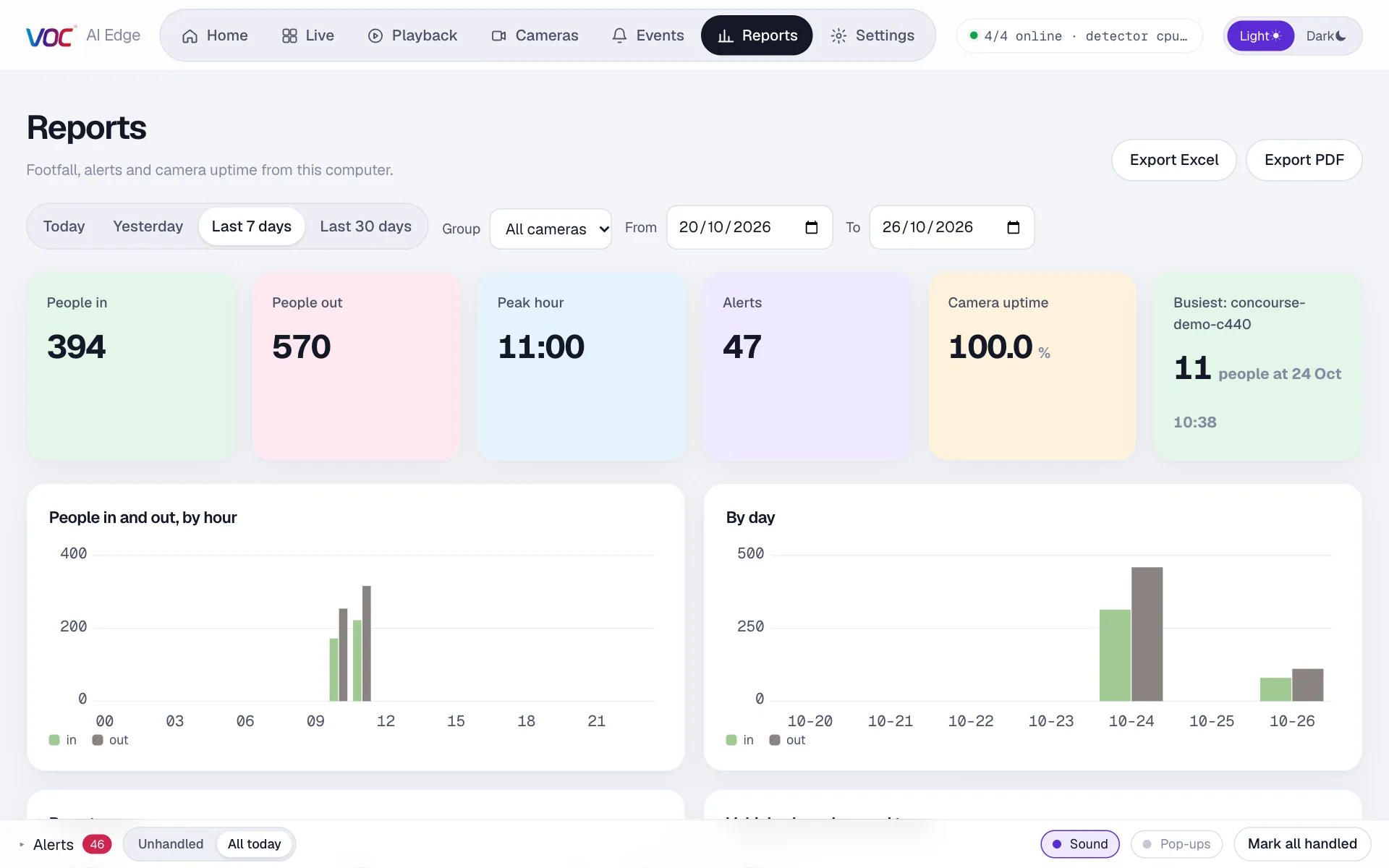
Footfall by hour and day, vehicles by colour and type, alerts by kind, heatmaps, queue waiting times and camera uptime, for one camera group or the whole site.

  • Today, yesterday, last 7 or 30 days, or any range
  • One click to Excel or PDF
Reports page with footfall in and out, peak hour, alert totals, camera uptime and charts by hour and day

Product tour

A real screen recording: drawing an alert area, the alert arriving, a guard handling it, jumping to playback, vehicles, number plates read live, a busy shop and the weekly report.

Sample footage, recorded on a laptop with no graphics card. Narration in English.

Every feature

Fifteen short chapters, each a real screen recording: any camera brand, live view, counting, alert areas, alerts and playback, vehicles, number plates with their footage, shops, heatmaps, reports, your team, access from anywhere and how it looks after itself.

Sample footage, recorded on the current version. 4 minutes, narration in English.

How it works

01

Connect your recorder

Install VOC AI Edge on a PC at the site. Enter your DVR or NVR's address and login once. It finds every channel and shows you what each camera sees.

02

Draw what matters

Switch on the analytics each camera needs. Draw the gate, the counter, the doorway. Pick the hours an area is armed, like nights and Sundays.

03

Get alerts and reports

Alerts arrive with the photo and clip on screen and on your phone. Every week, the numbers: footfall, vehicles, queues, alerts and uptime.

What we learned from the market

Before writing code we studied more than a dozen video-AI platforms, from global cloud security companies to Indian video-analytics startups. Four ideas kept proving right. We kept them and changed the rest.
Keep the cameras

The platforms customers like most connect to the cameras a site already has. Ripping out working cameras is the fastest way to lose a customer.

Think at the site

Serious systems analyse video next to the cameras and send only events. Fast upload is not something to assume in India or East Africa.

Alerts people act on

An alert needs a photo, a clip and a clear “handled” step. Otherwise it is noise, and noise gets switched off.

Familiar screens

Security teams already know live view, playback and event lists from their recorder's software. We kept that shape, so there is almost nothing to learn.

VOC AI EdgeTypical cloud camera platformAnalytics built into one camera brand
Works with your existing DVR and camerasYes, any brand, analog HD through the DVROften needs their cameras or a paid connectorOnly that brand's newer smart cameras
Where the AI runsAt your siteMostly in the cloudInside each camera
Internet neededOnly to send alerts and for remote accessStrong, constant uploadNot for analytics
Where your video is keptOn your premisesOn their serversOn your recorder
One place for every camera's analyticsYes, one list per camera, same for every brandYesDifferent menus per camera model
Alerts with photo, clip and handled notesYesUsuallyBasic, often a snapshot only

A general comparison of common approaches based on our market research, not a review of any one product. Every vendor differs.

Who it's for

Shops and pharmaciesFootfall, queue times, after-hours intrusion, the cash counter.
WarehousesRestricted zones, gates, loading bays and night perimeter.
OfficesEntrances, server rooms, crowd limits in common areas.
Parking and fuel stationsVehicles in and out by type and colour, out-of-hours alerts.
Hotels, lodges and campsNight perimeter, reception queues, and the owner's view from anywhere.
Multi-site businessesMany branches, one way of watching them, groups and reports per site.

Privacy and control

Video stays on siteRecordings are kept on the PC at your site. Only alerts, photos and clips you choose to send leave it.
Encrypted remote accessWatching from another place goes through an end-to-end encrypted link, with no router changes and nothing exposed to the internet. Rolling out now.
People and rolesOwners set things up, managers see reports, guards watch and handle alerts. Each signs in with their own PIN.
Face blurringFaces can be pixelated on screen and in photos. No face recognition is used.

Questions

Do I need to buy new cameras?

No. VOC AI Edge connects to the cameras and recorders you already have: analog HD cameras through their DVR, IP cameras through an NVR or directly. Hikvision, Prama, Dahua, CP Plus, Uniview, Axis and any camera that offers an RTSP or ONVIF stream.

Does my video go to the cloud?

No. The analysis runs on a PC at your site and the recordings stay there. Alerts, photos and short clips go to the people you choose.

What do I need at the site?

A Windows or Mac computer on the same network as your recorder, left switched on. An ordinary office PC handles about four to six busy cameras. A dedicated box for larger sites is planned.

Can I watch from home or another branch?

Remote access is being rolled out now. The site connects out through an end-to-end encrypted link and you pair another computer with a code, so there's no router setup and nothing is exposed to the internet. Ask us when you book your demo.

How fast are the alerts?

In our tests an alert appeared about two to three seconds after a person stepped into the area, with the photo. The video clip follows a few seconds later.

Does it recognise faces?

No. VOC AI Edge detects people and vehicles, not who someone is. It can blur faces when privacy matters.

Bring us one camera. We'll show you what it has been missing.

We'll connect VOC AI Edge to your recorder, set up the analytics that matter for your site, and show you the first alerts and reports.

VOC AI Edge is brought to you by VOC in partnership with Tarkashila. VOC is a trademark of its owner.